A Guide to Phishing: Examples, Prevention, & More

Worm Phishing Campaign Success On The Rise
emma-stevens-bio-portrait
Written by Emma Stevens
Threat Intelligence Researcher

Audio Recap


What is phishing?

Phishing is a cyberattack where criminals impersonate trusted entities like banks, companies, or even coworkers, to trick individuals into giving up sensitive information such as passwords, credit card numbers, or login credentials.

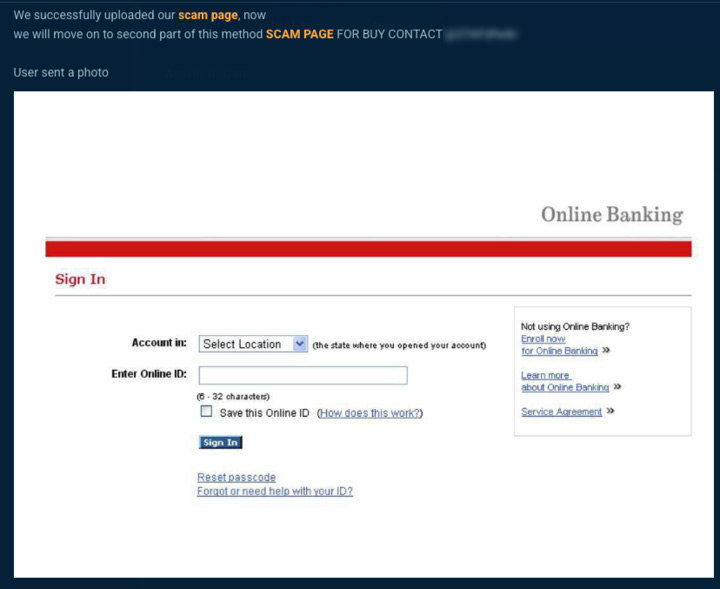
What’s alarming is how easy and accessible phishing has become. On the cyber underground, phishing kits, templates, and services are openly bought and sold, making it simple for even low-skilled threat actors to launch convincing attacks.

Through Bitsight Threat Intelligence, we regularly observe threat actors and cyber criminals discussing phish kits, targets, and techniques. Phishing is a part of a thriving black-market economy.

So what?

The ease of access and volume of chatter suggest phishing attacks are likely to increase in both frequency and sophistication.

How phishing attacks work

Phishing attacks may vary in complexity, but most follow a basic pattern. Here’s a simplified overview of how they typically unfold:

Setup

Threat actors start by creating a fake but convincing version of a legitimate website—like a bank login page or corporate portal. They may use phishing kits bought on underground markets that come with ready-made templates, logos, and scripts.

Infrastructure deployment

The attacker registers lookalike domains (e.g., using slight misspellings (typosquatting) or extra characters) and hosts the phishing page on a server. Sometimes they use compromised websites to avoid detection.

Lure creation

The attacker crafts a message, usually an email, but sometimes SMS (smishing) or social media, that impersonates a trusted source and urges the target to click a link or download a file. These messages often use urgency (e.g., "Your account has been locked") to drive action.

Rollout

The phishing message is sent out to many targets, or in some cases, tailored for specific individuals (spear phishing). When a victim clicks the link, they’re directed to the fake site and tricked into entering credentials or other sensitive information.

Harvest and exploit

Once information is submitted, it’s captured and sent back to the attacker. They can then use it for account takeovers, financial fraud, or sell it on underground markets. 

Phishing’s success lies in its ability to blend realism with deception. Some scams are crude and easy to spot, but many are carefully crafted to appear legitimate, using accurate logos, familiar language, and even personal details to build trust. By mimicking trusted senders or leveraging relevant context, attackers make their messages convincing enough that even cautious users may be tricked into clicking a malicious link or opening a dangerous attachment.

Effects of phishing scams 

Phishing scams may seem simple, but their effects can be severe and far-reaching. These attacks are designed to trick users into revealing sensitive information or granting access to systems, often with serious consequences for individuals and organizations alike.

Here’s what phishing can do:

  • Credential theft: Phishing often targets usernames and passwords. Once stolen, attackers can access email accounts, internal systems, or financial platforms, leading to data breaches, fraud, or account takeovers.
  • Financial loss: Many phishing scams trick victims into transferring money or paying fraudulent invoices. For businesses, this can result in direct financial theft or loss due to fraudulent wire transfers and payroll redirection.
  • Malware installation: Some phishing messages contain malicious links or attachments. Clicking them can install malware such as ransomware, spyware, or remote access trojans, giving attackers control over a device or network.
  • Business disruption: A successful phishing attack can shut down systems, delay operations, or lock up critical files—particularly in ransomware cases. The resulting downtime can hurt productivity, customer trust, and revenue.
  • Reputational damage: When phishing leads to a data breach or public incident, the fallout can damage a company’s brand and erode customer or investor confidence.
  • Compliance and legal risk: Exposure of sensitive data (e.g., PII, health records, or financial info) can trigger regulatory penalties, lawsuits, and costly remediation efforts.

The effects of a single phishing email can be catastrophic. Once inside, threat actors can use the initial access point to move laterally across systems, escalate privileges, exfiltrate sensitive data, and even deploy ransomware for extortion. Beyond the immediate disruption, the long-term consequences of a phishing attack often include regulatory penalties, financial loss, and reputational damage that can erode customer and stakeholder trust.

Phishing in cybersecurity 

Phishing is one of the most persistent and effective threats in cybersecurity today. Despite years of awareness training and technical defenses, phishing continues to be the number one entry point for cyberattacks across industries.

Why it matters:

  • Initial access for larger attacks: Phishing is often the first step in a broader attack chain. It’s how threat actors gain a foothold in a network, leading to ransomware deployment, business email compromise (BEC), or data exfiltration. Even nation-state actors rely on phishing to target specific organizations and sectors.
  • Human error is hard to patch: Firewalls and antivirus can block known threats, but phishing preys on people. A well-crafted email can bypass filters and fool even tech-savvy users. This makes phishing a uniquely difficult problem to solve with technology alone.
  • High return on investment for attackers: Phishing kits, templates, and infrastructure are widely available and low-cost on the underground. With minimal effort, attackers can launch thousands of messages, knowing it only takes one click to succeed. That scalability keeps phishing a top tactic year after year.
  • Cross-industry risk: No sector is immune. From healthcare and financial services to education and manufacturing, phishing affects all industries, especially those with valuable data, critical operations, or large attack surfaces.

How to identify phishing emails 

When entering sensitive information online, always verify the website URL is correct, ensure it uses ‘https’ (look for the lock icon), double-check spelling, and watch for unusual design or content changes. Likewise, be cautious with emails—phishing attempts often use urgent language, suspicious links, or attachments to trick you into clicking. Always verify the sender and never share credentials or personal details through email.

1. Check the sender

  • Look at the email address closely—not just the display name.
  • Be wary of generic senders like [email protected] pretending to be from a bank.

2. Examine the subject & content

  • Urgency / Fear tactics: “Your account will be suspended in 24 hours!”
  • Too good to be true: “You’ve won a prize!”
  • Unusual tone: If it’s from a colleague but the wording feels off.
  • Emails from high level executives: A high level executive reaching out with an urgent request

3. Look for suspicious links

  • Hover over links (don’t click) to preview the real URL.
  • Check for typos, extra characters, or strange domains (e.g., .ru, .cn instead of .com).
  • Use trusted company bookmarks instead of clicking links in emails.

4. Check attachments

  • Unexpected attachments (especially .zip, .exe, .js, or even disguised Word/PDF files) are high risk.
  • Only open attachments you’re expecting from trusted senders.

5. Watch for brand spoofing

  • Logos and templates can be copied—but look for formatting mistakes, blurry images, or odd wording.
  • Official companies rarely misspell their own name.

6. Check the greeting & signature

  • Phishing emails often use generic greetings like “Dear User” or “Valued Customer”.
  • Lack of a proper company signature or contact details is another red flag.

7. Verify requests for sensitive info

  • Legitimate companies will not ask for passwords, SSNs, or banking details via email.
  • If in doubt, contact the company directly through official support channels.

8. Use security tools

  • Email security filters (e.g., Microsoft Defender, Proofpoint, Mimecast).
  • Browser protections that block known malicious sites.
  • Bitsight intelligence can help identify if domains are linked to threat actors or underground activity.
Quick safety rule

If something feels “off,” trust your instincts.
Don’t click. Don’t download. Verify through another channel.

phishing emial example banking

Phishing attacks & examples 

  • Email phishingMass emails impersonating trusted organizations to steal credentials or deliver malware.
    Example: Many ransomware incidents, including early Emotet infections, began with simple phishing emails carrying malicious attachments.
  • Spear phishing: Highly targeted phishing crafted for specific individuals using personal/professional details.
    Example: The 2016 Democratic National Committee (DNC) breach started with a spear phishing email that compromised staff accounts.
  • Business email compromise (BEC): Attackers impersonate executives or vendors to trick employees into wiring funds or releasing sensitive data.
    Example: The FBI reports that BEC scams have cost organizations over $50 billion globally since 2013.
  • Smishing (SMS phishing): Fraudulent text messages containing malicious links or prompts to share credentials.
    Example: Attackers frequently impersonate delivery services (FedEx, UPS, DHL) to trick users into entering credit card info on fake sites.
  • Vishing (Voice phishing): Phone calls where attackers impersonate banks, IT helpdesks, or government officials.
    Example: The “Twitter Hack” of 2020, where attackers socially engineered Twitter employees over the phone, leading to takeover of high-profile accounts (Elon Musk, Barack Obama).
  • Clone phishing: Replicating a legitimate email the victim has already received, but replacing attachments or links with malicious versions.
    Example: Attackers have cloned Microsoft 365 security alerts, tricking employees into “re-verifying” credentials.
  • Whaling: Spear phishing that specifically targets senior executives or board members.
    Example: In 2015, Ubiquiti Networks lost $46.7 million after attackers impersonated executives via whaling emails.
  • Angler phishing: Fake social media or customer support accounts trick users into revealing sensitive details.
    Example: Attackers on Twitter/X have posed as airline customer support to steal passenger booking and payment details.
  • Quishing (QR code phishing): Using QR codes in emails or printed material to redirect victims to malicious websites.
    Example: In 2023, campaigns targeted Microsoft 365 users by embedding malicious QR codes in “MFA reset” emails.

How do phishing scams stay relevant? 

Phishing scams remain a leading cyber threat because they constantly evolve and continue to deliver results for attackers. According to the 2025 State of the Underground report, phishing was mentioned in over 17,000 Telegram chats and 2,400 underground forum threads in a single month—highlighting its ongoing popularity in the cybercrime ecosystem. Tactics have become more advanced, with attackers using AI-generated messages, QR-based phishing ("quishing"), and voice phishing ("vishing") to bypass traditional defenses. The rise of Phishing-as-a-Service (PhaaS) has made it easier than ever for low-skilled actors to launch sophisticated campaigns using ready-made kits, spoofed websites, and victim-tracking dashboards. 

At its core, phishing continues to succeed because it exploits human behavior—a vulnerability that technology alone can’t fully eliminate. As long as credentials and access remain valuable, phishing will stay relevant. Bitsight Cyber Threat Intelligence helps organizations track evolving phishing tactics, monitor underground activity, and proactively defend against these persistent threats.

How to prevent phishing attacks 

Phishing cannot be eliminated entirely, but its impact can be drastically reduced with the right mix of people, processes, and technology. Because phishing exploits human behavior just as much as technical weaknesses, prevention requires a layered defense strategy that addresses both awareness and detection.

Key strategies to reduce phishing risk include:

  • Strengthen credential security: Enforce multi-factor authentication (MFA) across critical systems, use strong unique passwords, and monitor for leaked credentials on the dark web.
  • Invest in email security: Deploy advanced email filtering, DMARC/DKIM/SPF protocols, and anomaly detection to block suspicious inbound messages before they reach inboxes.
  • Train employees continuously: Conduct regular phishing simulations and awareness campaigns to build a “human firewall.” Teach staff to recognize red flags such as urgent requests, unusual senders, or unexpected links.
  • Implement endpoint and network protections: Use Endpoint Detection and Response (EDR) to identify malicious payloads delivered through phishing, and segment networks to limit lateral movement if attackers gain access.
  • Maintain secure backups: Protect against ransomware delivered via phishing by ensuring offline or immutable backups are available and tested.
  • Monitor and respond with threat intelligence: Use intelligence-driven monitoring to detect phishing infrastructure, domains, and campaigns targeting your brand or employees.

What are phishing kits? 

Phishing kits are pre-packaged toolsets that make it easy for cybercriminals to launch phishing attacks, even if they lack technical expertise. They typically include:

  • Ready-made phishing webpages: often replicas of popular login portals (banks, Microsoft 365, PayPal, etc.) designed to capture usernames, passwords, and other credentials.
  • Installation scripts: simple instructions that allow the kit to be deployed quickly on a compromised or rented server.
  • Data collection tools: mechanisms to harvest and store victim information, such as credentials or payment details, and send it back to the attacker.
  • Customization options: many kits allow criminals to add branding, logos, or targeted details to make the phishing page look more convincing.

Why phishing kits matter

  • Lower barrier to entry: Even “script kiddies” (low-skill attackers) can purchase a kit on underground forums and launch an attack with little effort.
  • Scale & speed: Attackers can replicate phishing campaigns across thousands of victims in minutes.
  • Professionalization of crime: Many kits come with updates, technical support, and even subscription models, mirroring legitimate SaaS platforms.
  • Evasion features: Advanced kits may include obfuscation, geofencing (targeting victims in specific countries), and detection-avoidance tools.

Phishing kits industrialize cybercrime. They turn what used to require coding skills into a “plug-and-play” service, making phishing one of the most persistent and scalable attack methods today.

Phishing tools and services

There are a variety of phishing tools and services available for threat actors in the underground. One notable was the phishing-as-a-service program, Evilproxy, which provides the ability to run phishing attacks with reverse proxy capabilities that steal credentials and assist in bypassing 2FA:

Figure 4. A threat actor advertising their phishing as a service with EvilProxy.
A threat actor advertising their phishing as a service with EvilProxy.

EvilPhish

For those looking for less expensive options, there are free tools available that can be used for experimentation or in real attacks. For example, EvilPhish is an open-source tool available on Github that simply creates an evil twin of a web page and redirects traffic to a local web server hosting the phishing page. To demonstrate how accessible these tools are for threat actors, our research team installed EvilPhish in our attack box and tried it for ourselves.

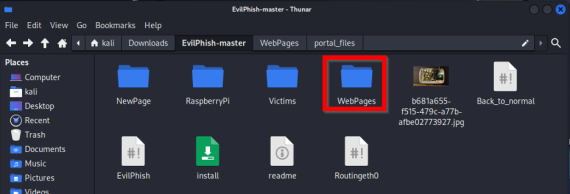
EvilPhish is a simple script that copies a web page of your choosing to use as a template for your own phishing page. For the demonstration, we used Bitsight Threat Intelligence, formerly Cybersixgill, portal login page and downloaded the HTML to save in our EvilPhish folder. From there, we ran a command on that file, “./NewPage” and moved all the files to our WebPages folder.

Figure 5. Copying HTML file to WebPages folder.
Copying HTML file to WebPages folder.

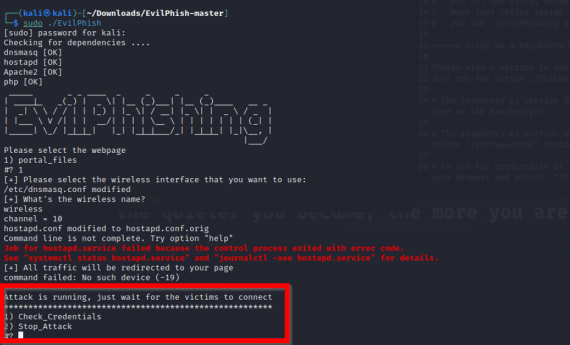
Next, we ran the EvilPhish script on our WebPages folder to create the new phishing page.

Figure 6. Running the ./EvilPhish script on the HTML files.
Running the ./EvilPhish script on the HTML files.

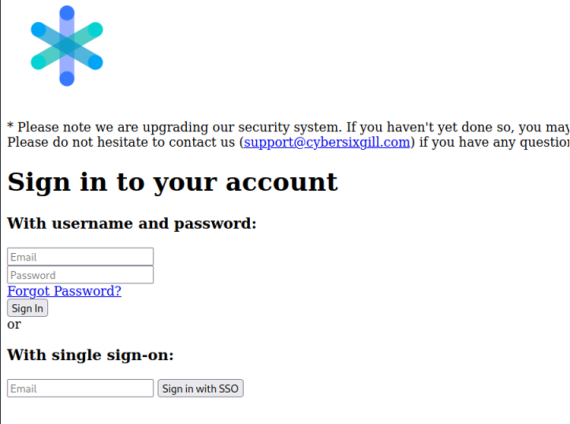
As you can see in the below screenshot, our phishing page ran locally while waiting for users to input their credentials.

Figure 7. A phishing page impersonating Cybersixgill, a Bitsight company, that we created with EvilPhish.
A phishing page impersonating Cybersixgill (now Bitsight Threat Intelligence) that we created with EvilPhish.

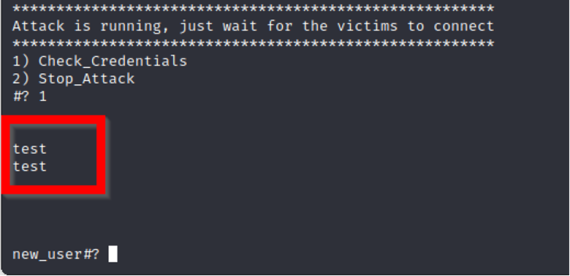
As a test, we inserted “test” for the username and password to see what EvilPhish captured.

Figure 8. Example of captured user credentials entered on our phishing page.
Example of captured user credentials entered on our phishing page.

Once we confirm the tool works, all that a threat actor would need to do is host this on a public domain and redirect traffic to the scam page through various techniques such as embedded links, phishing emails, SMS, and more. Additionally, one can make the page look more convincing through some HTML and CSS modifications.

SOTU cover Image

Report: 7.7 Million endpoint logs for sale & more

Stealer malware is thriving—especially Lumma and Risepro. These logs fuel ransomware, MFA bypass, and persistent access. It's $10 to compromise an account. Explore this and other insights the data reveals.