Phishing is a cyberattack where criminals impersonate trusted entities like banks, companies, or even coworkers, to trick individuals into giving up sensitive information such as passwords, credit card numbers, or login credentials.
What’s alarming is how easy and accessible phishing has become. On the cyber underground, phishing kits, templates, and services are openly bought and sold, making it simple for even low-skilled threat actors to launch convincing attacks.
Through Bitsight Threat Intelligence, we regularly observe threat actors and cyber criminals discussing phish kits, targets, and techniques. Phishing is a part of a thriving black-market economy.
So what?
The ease of access and volume of chatter suggest phishing attacks are likely to increase in both frequency and sophistication.
How phishing attacks work
Phishing attacks may vary in complexity, but most follow a basic pattern. Here’s a simplified overview of how they typically unfold:
Setup
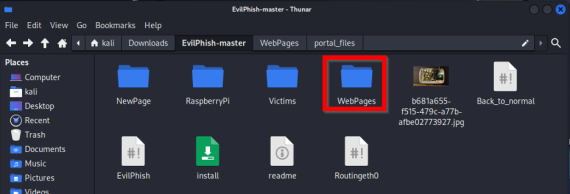
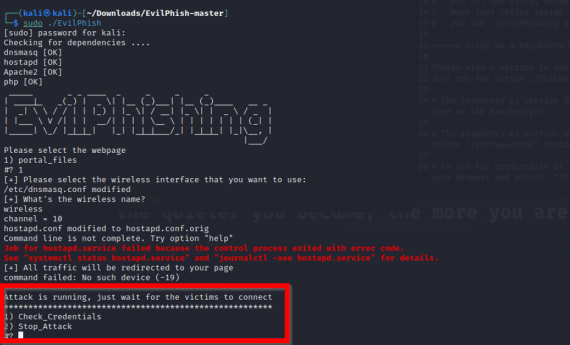
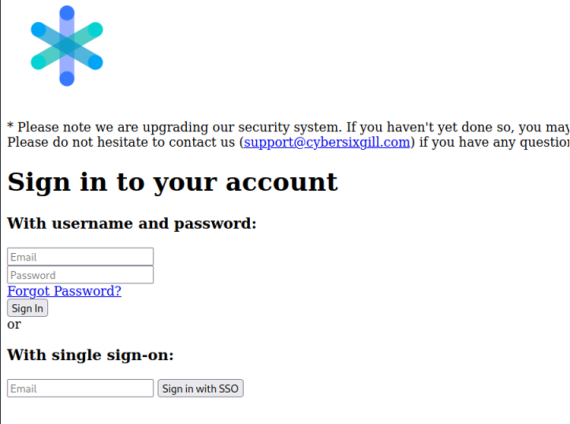
Threat actors start by creating a fake but convincing version of a legitimate website—like a bank login page or corporate portal. They may use phishing kits bought on underground markets that come with ready-made templates, logos, and scripts.
Infrastructure deployment
The attacker registers lookalike domains (e.g., using slight misspellings (typosquatting) or extra characters) and hosts the phishing page on a server. Sometimes they use compromised websites to avoid detection.
Lure creation
The attacker crafts a message, usually an email, but sometimes SMS (smishing) or social media, that impersonates a trusted source and urges the target to click a link or download a file. These messages often use urgency (e.g., "Your account has been locked") to drive action.
Rollout
The phishing message is sent out to many targets, or in some cases, tailored for specific individuals (spear phishing). When a victim clicks the link, they’re directed to the fake site and tricked into entering credentials or other sensitive information.
Harvest and exploit
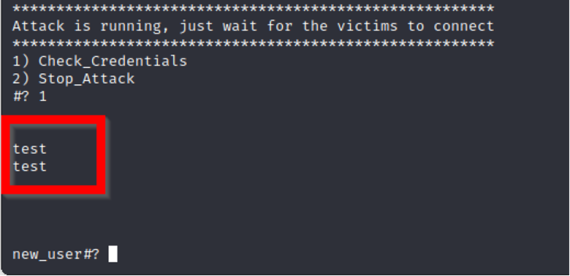
Once information is submitted, it’s captured and sent back to the attacker. They can then use it for account takeovers, financial fraud, or sell it on underground markets.
Phishing’s success lies in its ability to blend realism with deception. Some scams are crude and easy to spot, but many are carefully crafted to appear legitimate, using accurate logos, familiar language, and even personal details to build trust. By mimicking trusted senders or leveraging relevant context, attackers make their messages convincing enough that even cautious users may be tricked into clicking a malicious link or opening a dangerous attachment.
Phishing links are a common delivery method for these attacks, directing users to fraudulent websites designed to capture sensitive information. Understanding how phishing links work and recognizing suspicious URLs can help organizations reduce the risk of credential theft and unauthorized access.
Effects of phishing scams
Phishing scams may seem simple, but their effects can be severe and far-reaching. These attacks are designed to trick users into revealing sensitive information or granting access to systems, often with serious consequences for individuals and organizations alike.
Here’s what phishing can do:
- Credential theft: Phishing often targets usernames and passwords. Once stolen, attackers can access email accounts, internal systems, or financial platforms, leading to data breaches, fraud, or account takeovers.
- Financial loss: Many phishing scams trick victims into transferring money or paying fraudulent invoices. For businesses, this can result in direct financial theft or loss due to fraudulent wire transfers and payroll redirection.
- Malware installation: Some phishing messages contain malicious links or attachments. Clicking them can install malware such as ransomware, spyware, or remote access trojans, giving attackers control over a device or network.
- Business disruption: A successful phishing attack can shut down systems, delay operations, or lock up critical files—particularly in ransomware cases. The resulting downtime can hurt productivity, customer trust, and revenue.
- Reputational damage: When phishing leads to a data breach or public incident, the fallout can damage a company’s brand and erode customer or investor confidence.
- Compliance and legal risk: Exposure of sensitive data (e.g., PII, health records, or financial info) can trigger regulatory penalties, lawsuits, and costly remediation efforts.
The effects of a single phishing email can be catastrophic. Once inside, threat actors can use the initial access point to move laterally across systems, escalate privileges, exfiltrate sensitive data, and even deploy ransomware for extortion. Beyond the immediate disruption, the long-term consequences of a phishing attack often include regulatory penalties, financial loss, and reputational damage that can erode customer and stakeholder trust.
Phishing in cybersecurity
Phishing is one of the most persistent and effective threats in cybersecurity today. Despite years of awareness training and technical defenses, phishing continues to be the number one entry point for cyberattacks across industries.
Why it matters:
- Initial access for larger attacks: Phishing is often the first step in a broader attack chain. It’s how threat actors gain a foothold in a network, leading to ransomware deployment, business email compromise (BEC), or data exfiltration. Even nation-state actors rely on phishing to target specific organizations and sectors.
- Human error is hard to patch: Firewalls and antivirus can block known threats, but phishing preys on people. A well-crafted email can bypass filters and fool even tech-savvy users. This makes phishing a uniquely difficult problem to solve with technology alone.
- High return on investment for attackers: Phishing kits, templates, and infrastructure are widely available and low-cost on the underground. With minimal effort, attackers can launch thousands of messages, knowing it only takes one click to succeed. That scalability keeps phishing a top tactic year after year.
- Cross-industry risk: No sector is immune. From healthcare and financial services to education and manufacturing, phishing affects all industries, especially those with valuable data, critical operations, or large attack surfaces.
How to identify phishing emails
When entering sensitive information online, verify that the website's domain matches the organization you intend to visit. HTTPS encrypts the connection but does not establish that a website is legitimate. Be cautious of unexpected links, lookalike domains, and unfamiliar login pages. If a message requests sensitive information, navigate directly to the organization's verified website or contact it through a trusted channel.
1. Check the sender
- Look at the email address closely—not just the display name.
- Example: [email protected] (with a “1” instead of “l”).
- Be wary of generic senders like [email protected] pretending to be from a bank.
2. Examine the subject & content
- Urgency / Fear tactics: “Your account will be suspended in 24 hours!”
- Too good to be true: “You’ve won a prize!”
- Unusual tone: If it’s from a colleague but the wording feels off.
- Emails from high level executives: A high level executive reaching out with an urgent request
3. Look for suspicious links
- Hover over links (don’t click) to preview the real URL.
- Check for typos, extra characters, or strange domains (e.g., .ru, .cn instead of .com).
- Use trusted company bookmarks instead of clicking links in emails.
4. Check attachments
- Unexpected attachments (especially .zip, .exe, .js, or even disguised Word/PDF files) are high risk.
- Only open attachments you’re expecting from trusted senders.
5. Watch for brand spoofing
- Logos and templates can be copied—but look for formatting mistakes, blurry images, or odd wording.
- Official companies rarely misspell their own name.
6. Check the greeting & signature
- Phishing emails often use generic greetings like “Dear User” or “Valued Customer”.
- Lack of a proper company signature or contact details is another red flag.
7. Verify requests for sensitive info
- Legitimate companies will not ask for passwords, SSNs, or banking details via email.
- If in doubt, contact the company directly through official support channels.
8. Use security tools
- Email security filters (e.g., Microsoft Defender, Proofpoint, Mimecast).
- Browser protections that block known malicious sites.
- Bitsight intelligence can help identify if domains are linked to threat actors or underground activity.