A more systematic and collaborative approach to risk mitigation
Automated workflows between Bitsight and Jira gives security teams a simple, reliable, and scalable way to turn security findings into action. Security professionals reviewing Bitsight findings can now submit information-rich Jira requests to system administrators, software developers, operations teams, and other internal collaborators right from the Bitsight portal.
This helps Bitsight customers unlock new value from SPM by:
- Accelerating Issue Escalation: Security findings and requested actions are pushed directly into Jira, expediting issue routing to the most appropriate team.
- Enhancing Collaboration: Stakeholders engaged by the security team can receive, prioritize, and fulfill security requests using their preferred tool, while ensuring that the security team has ongoing visibility into status in the Bitsight portal.
- Increasing Operational Efficiency: Time-consuming and error-prone copy and paste or data export workflows are replaced with automatic synchronization of findings details from Bitsight to Jira.
- Improving Security Execution: Simplifying and expediting response to high-priority security findings increases the likelihood that security weaknesses will be resolved before they can be exploited by threat actors.
How Bitsight’s Jira integration works
Bitsight administrators can configure the Jira integration in a few simple steps on the portal’s integration settings page. OAUTH authentication with Atlassian makes it easy to establish a secure connection to your Jira instance, after which you can specify a preferred Jira project for Bitsight to interact with.
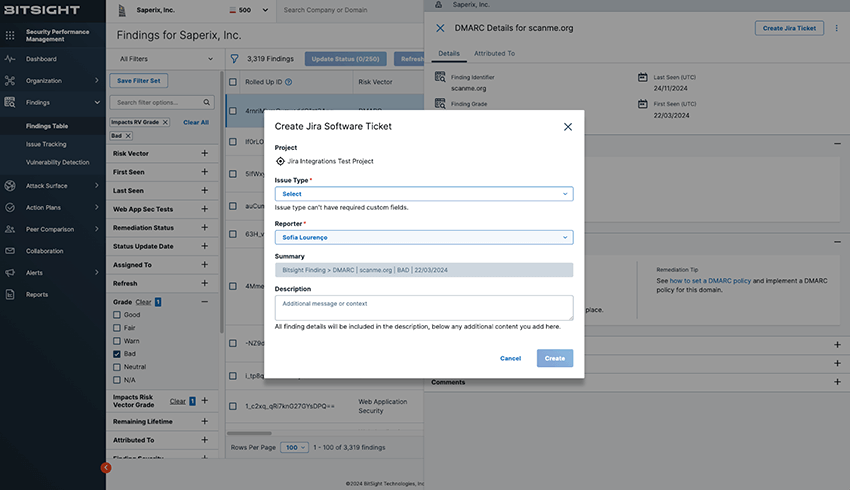
Once the Jira integration is enabled, any authorized Bitsight user viewing a security finding can generate and assign a Jira ticket automatically right from the Bitsight portal.
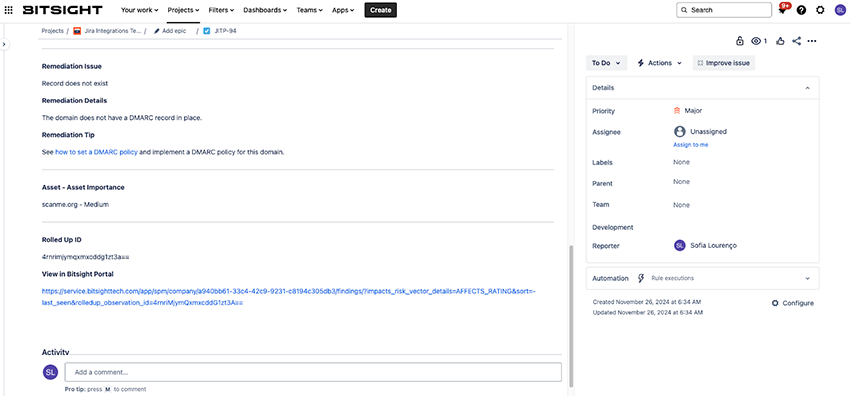
All of the relevant details about the finding are automatically added to the Jira ticket, and the requestor can also add a personalized message or additional supporting details.
All of this information, including the specific steps needed to remediate the issue, are then visible right in the Jira ticket when the assignee is ready to act on the request. They can also optionally follow a direct link to the full security finding details in the Bitisight portal if desired.
As the security team performs follow-up reviews on findings in the Bitsight portal, they can see Jira status details at a glance and optionally follow a link to the full Jira ticket to view additional activity details or communicate with the assignee. This keeps everyone on the same page and accelerates time to issue resolution.
Learn more and get started
Jira integration is available now to all Bitsight SPM customers who have the External Attack Surface Management (EASM) Enhanced module. To get started, visit the integrations settings page in the Bitsight portal and follow the step-by-step instructions in our knowledge base.
We’re also here to help guide you through the process. Feel free to contact your Bitsight customer success manager for a personalized overview of this new functionality and one-on-one assistance with the setup process.
We’re committed to helping our customers find innovative ways to turn security findings and insights into systematic risk reduction, and our new Jira integration is the latest example of this. If your organization uses Jira, I hope you will give it a try and share your feedback.
And even if your organization does not use Jira today, we hope his information gets you thinking about new ways to streamline how your team uses Bitsight. We welcome your participation in the growing community of organizations exploring new ways to harness Bitsight strategically and systematically.