Bitsight recently completed a reorganization of a large part of our Single Page Application (SPA) code. Our goal was to make our codebase more scalable and developer-friendly by adding a few simple rules for where different parts of the application should live. In this article, I’ll describe what we left the same, what we changed, and how we did this while continuing to ship features on time.
Starting at the fundamentals
We created our SPA using Facebook’s excellent create react app project. Some of that initial application setup code went into our base app folder. As our application grew in complexity we added Redux to manage the state and react-router for navigation, so our app folder also contains the base reducer, action, and, router. We avoided modifying this folder as much as possible during the reorganization.
During this process, we were not changing how our pages looked or behaved, just the code structure behind the scenes. Our layouts folder contains the main logic for displaying content in our pages, so it was in good shape pre-refactor and needed few changes. The core layout, which is the scaffolding (header, footer, etc) used to organize all of our SPA pages, lives there along with top-level structure for other pages.
By isolating our core application initialization and display logic from the rest of our application, we were able to change the rest of the code structure with less risk. During this process, the foundations of the application did not change, which reduced our risk of serious regressions.
If everything is a module...
Almost everything else related to the SPA initially lived in the modules folder. This included react components, redux actions, reducers and sagas, routing logic, SCSS, and tests. We did subdivide the modules into folders by function, so related components lived together in folders, reducers were with their related actions and sagas, and so on.
Bitsight has been migrating our existing frontend application to a SPA architecture on a page-by-page basis. As we added pages to the SPA, we discovered that we were creating a lot of new folders for our new features. Some folders contained only code to manage state, while others had react components. A few had both state and components. Eventually we had components which were referencing actions from another folder, as an early signal that our abstractions were breaking down.
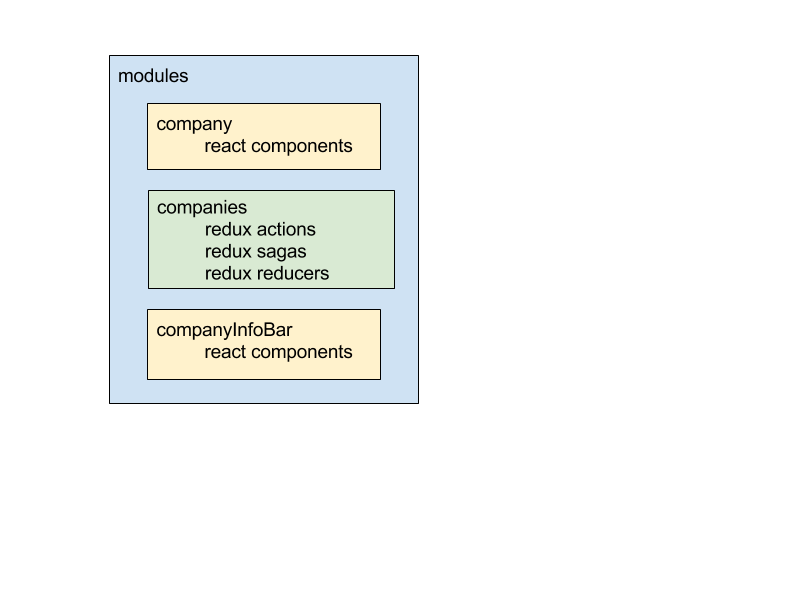
Our wake up call that we needed to fix things was when we wound up with three folders named company, companies, and companyInfoBar respectively. The company folder contained React components to display company data, the companies folder had redux actions and reducers to retrieve company data from our API, and the companyInfoBar component had more React components. As you can imagine, keeping them straight was a little tricky.
We needed an intuitive, simple set of rules to separate our code into sections. The transition to this new setup also needed to happen without negatively impacting our release cycle....then nothing is a module.
...then nothing is a module
Before our reorganization, we researched how other organizations had addressed this issue; here are three links that we found helpful. Our main takeaway was that we needed to further separate out our SPA code based on function. By keeping everything in the modules folder, we had three types of code all living in the same place: React components to show data, state management code to retrieve and manage the data, and routing logic to navigate the application. Once we realized that we needed new folders for routing, state, and components, we dove into the nitty-gritty of where these folders would live and what they would be named.
The new routes folder was the simplest of the three. Routes had previously been stored in folders with their related components, but routing and display logic are different enough that keeping them together was not necessary. The SPA was already structured so that each top-level route had its own routing file. The main app router just imported all of those routes to connect them.
.png)
.png)